| Name | Value |
|---|---|
width |
1244.0 |
height |
700.0 |
margin |
5.0e-2 |
center |
0.0 |
| Name | Value |
|---|---|
resource-pack |
nwburg |
| Shades | Accents |
|---|---|
shade0 |
accent0 |
shade1 |
accent1 |
shade2 |
accent2 |
shade3 |
accent3 |
shade4 |
accent4 |
shade5 |
accent5 |
shade6 |
accent6 |
shade7 |
accent7 |
<section class="slide level1 present">
<div class="decker">
<div class="alignment">
<h1>Licht</h1>
<div class="layout">
<div class="area">
<div class="block">
<h2>Some Header</h2>
<p>Something or other</p>
</div>
</div>
</div>
</div>
</div>
</section>
<div class="media">
<figure class="image">
<img src="include/06-metal.png" alt="06-metal.png" />
<figcaption>
Alt Caption <span class="math inline">\(e=mc^2\)</span>
</figcaption>
</figure>
</div>
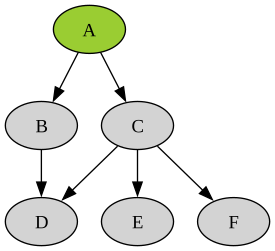
develop-layoutdevelopdevelopdeckerwburg and mariomaster to developdevelop-layout
wburg CSSmario CSSdevelop-master to developdevelop to master
function rainbow(numOfSteps, step) {
// This function generates vibrant, "evenly spaced" colours (i.e. no clustering). This is ideal for creating easily distinguishable vibrant markers in Google Maps and other apps.
// Adam Cole, 2011-Sept-14
var r, g, b;
var h = step / numOfSteps;
More function CODE(here) {return true;} here
function rainbow(numOfSteps, step) {
// This function generates vibrant, "evenly spaced" colours (i.e. no clustering). This is ideal for creating easily distinguishable vibrant markers in Google Maps and other apps.
// Adam Cole, 2011-Sept-14
var r, g, b;
var h = step / numOfSteps;
More function CODE(here) {return true;} here
function rainbow(numOfSteps, step) {
// This function generates vibrant, "evenly spaced" colours (i.e. no clustering). This is ideal for creating easily distinguishable vibrant markers in Google Maps and other apps.
// Adam Cole, 2011-Sept-14
var r, g, b;
var h = step / numOfSteps;
More function CODE(here) {return true;} here
One slightly longer line.
Should align with neighbors.
All right!
One slightly longer line.
Should align with.
One slightly longer line.
Should align with neighbors.
All right!
## Three {popup="center-up" .fragment .accent3}
1. Three πππ
2. Four πΊπΊπΊπΊ
Too flashy?
Call the style police at
015773846827
{width=50%}
{height=200px align=right}
<section id="local-image-height200px" class="slide level1">
<div class="decker">
<div class="section level1 alignment">
<h1>Local Image height=200px</h1>
<div class="layout">
<div class="area">
<div class="media" align="right">
<figure class="image" style="height:auto;width:auto;">
<img src="include/06-metal.png" style="height:200px;width:auto;" alt="06-metal.png" />
<figcaption>
Overwriting Block Caption <span class="math inline">\(e=mc^2\)</span>
</figcaption>
</figure>
</div>
</div>
</div>
</div>
</div>
</section>
{width=80% height=200px}
Some text some more export { hello };
function hello(div, color) {
div.innerHTML = `<svg viewBox="0 0 200 100" style="background-color:${color};width:90%;height:70%;"></svg>`;
}
code.
One
Two
Three
<section id="local-inline-media" class="slide level1">
<div class="decker">
<div class="section level1 alignment">
<h1>Local Inline Media</h1>
<div class="layout">
<div class="area">
<p>Some text <span class="media"><span class="figure video" style="height:auto;width:200px;"><video controls="1" allow="autoplay" data-autoplay="1" style="height:auto;width:100%;" src="pacman-perfect-game.mp4"></video></span></span> some more.</p>
<p><span class="media"><span class="figure image"><img src="include/06-metal.png" alt="06-metal.png" /><span class="figcaption"><span>One</span></span></span></span> <span class="media"><span class="figure image" style="height:auto;width:auto;"><img src="include/06-metal.png" style="height:100px;width:auto;" alt="06-metal.png" /><span class="figcaption"><span>Two</span></span></span></span></p>
</div>
</div>
</div>
</div>
</section>
Really TINY shit:

mastercaption = [Str "Caption", Space, Strong [Str "text"]]
html = toHtml caption
block = RawHtml ("<figcaption>" <> html <> "</figcaption>")
develop-layoutcaption = [Str "Caption", Space, Strong [Str "text"]]
block = tag "figcaption" $ Div nullAttr [Plain caption]